 Talking Avatar

An AI avatar kiosk your visitors can talk to
Put a realistic AI concierge on the screen in your lobby, front desk or showroom. Visitors tap Start call and ask out loud: it answers in their language from the facts you give it, and can alert your team through a tool. You pay for the minutes people talk, not the hours the screen is on.
- Any screen that runs Chrome
- Portrait or landscape
- $0.06 a minute, idle screens free
- Captions on screen
An AI avatar kiosk is a screen in a physical place, like a hotel lobby, an office front desk, a museum or a store, where a realistic AI avatar holds a spoken conversation with visitors. With Talking Avatar Voice Agents, you build the agent without code and open its page full screen in the kiosk's browser. You pay $0.06 per minute of conversation: a 2-minute question costs $0.12, and an idle screen costs nothing.
Who it's for
For places where visitors ask the same questions all day
Hotels and resorts
A lobby concierge for breakfast hours, Wi-Fi, checkout times, the spa and what's nearby, in each guest's language, at 3 a.m. as well as at noon.
Office receptions and coworking
Greets visitors, tells them where to go and how to sign in, and alerts the host or the front desk through a tool when someone arrives.
Museums, galleries and visitor centers
Answers questions about the collection, opening hours, tickets and the way to the next room, from the notes your team writes.
Stores and showrooms
Explains products and looks up stock or prices through your own API, so staff can spend their time on customers who need a person.
Trade shows and events
A booth greeter that explains what you do, answers the first questions and asks for the visitor's details for your team.
Clinics, campuses and public buildings
Directions, opening hours and check-in steps. Questions that need a professional go to a person, and its instructions can say so.
How it works
From template to kiosk, without code
- 1
Start from the Receptionist template
Write your venue's facts into its instructions: hours, Wi-Fi, directions from the screen, services and who to call, up to 20,000 characters. Add a menu, a product list or an event program as a knowledge base. Pick an avatar and a voice in your visitors' language.
- 2
Tune it for a public space
On the Conversation tab, set Noise reduction to Far field and the maximum call length to 5 minutes. On the Tools tab, add a tool that alerts your front desk.
- 3
Open it full screen on the kiosk
Start the kiosk's browser in kiosk mode on the agent's page. Visitors tap Start call, talk, and tap End call; the screen then offers Call again for the next visitor.
# Open the agent full screen when the kiosk starts
# (chrome.exe on Windows)
google-chrome --kiosk \
  "https://app.talking-avatar.dev/agent/YOUR_AGENT_ID?embed=1"

# Portrait 1080 x 1920 screen? Add this so the
# avatar fills it, with bigger text and buttons:
#   --force-device-scale-factor=2

# Managed Chrome policy, so the microphone is never asked
# (Linux: /etc/opt/chrome/policies/managed/kiosk.json)
{
  "AudioCaptureAllowedUrls": ["https://app.talking-avatar.dev/"]
}
# Role & Objective
You are Claire, the concierge on the lobby screen at the
Harbor Hotel. Guests walk up and talk to you. Answer their
questions, and call the front desk when they need a person.
# Personality & Tone
- Warm, polished and brief: guests are standing.
# Rules
- One or two short sentences, then let them talk.
- Answer only from the context below. If you don't know,
say so and offer to call the front desk.
- Give directions from this screen: "past the elevators".
- Never ask for card details or passwords.
- When they say thanks or goodbye, say goodbye and end
the call.
- Reply in the language they speak.
# Context
- Breakfast: 7 to 10:30, Garden Room, past the elevators.
- Wi-Fi: HarborGuest, password on the key card sleeve.
- Checkout: 11 a.m. Late checkout: ask the front desk.
- Nearby: [restaurants, pharmacy, station, walking times]Name: notify_front_desk
Description: Ask a staff member to come to the lobby
screen, when the guest needs a person.
Endpoint: https://example.com/agent/front-desk
Parameters (JSON Schema):
{
"type": "object",
"properties": {
"reason": { "type": "string", "description": "Like late checkout" },
"guest_name": { "type": "string" }
},
"required": ["reason"]
}Chrome opens the agent's page full screen, and the policy lets it use the microphone without asking. The instructions and the tool are examples: the agent calls your endpoint, or a Zapier, Make or n8n webhook that posts to Slack or Teams, with what the guest said.
What visitors and your team get
A concierge that talks, listens in a busy lobby and calls for help
Face-to-face answers
A photorealistic avatar with lip sync and natural expressions answers out loud from its instructions and knowledge bases, and says so when it doesn't know.
Speaks your visitors' language
It understands visitors in their own language and replies in it, with a voice in that language: 160 voices in 15 languages. Make a test call in each one first.
Hears through lobby noise
Far-field noise reduction for microphones a step away. In louder places, switch to silence-based turn-taking and raise its sensitivity threshold, or stop background voices from interrupting it.
Calls your team or your systems
Up to 20 tools, each an HTTPS endpoint of yours or a Zapier, Make or n8n webhook: alert the front desk, look up a booking, or log a visitor.
A transcript of every conversation
Every call in the dashboard with its transcript, length and cost, plus a signed post-call webhook, so you see what visitors ask and can improve its answers.
Captions and large buttons
Captions for noisy rooms and visitors with hearing loss, and large Mute, Captions and End call buttons. Each call starts fresh, with nothing kept from the visitor before.
On the screen
What visitors see on a portrait or landscape kiosk
The kiosk shows the agent's own call page, full screen: the avatar with a Start call button, then the live call with a countdown, captions and three large buttons.
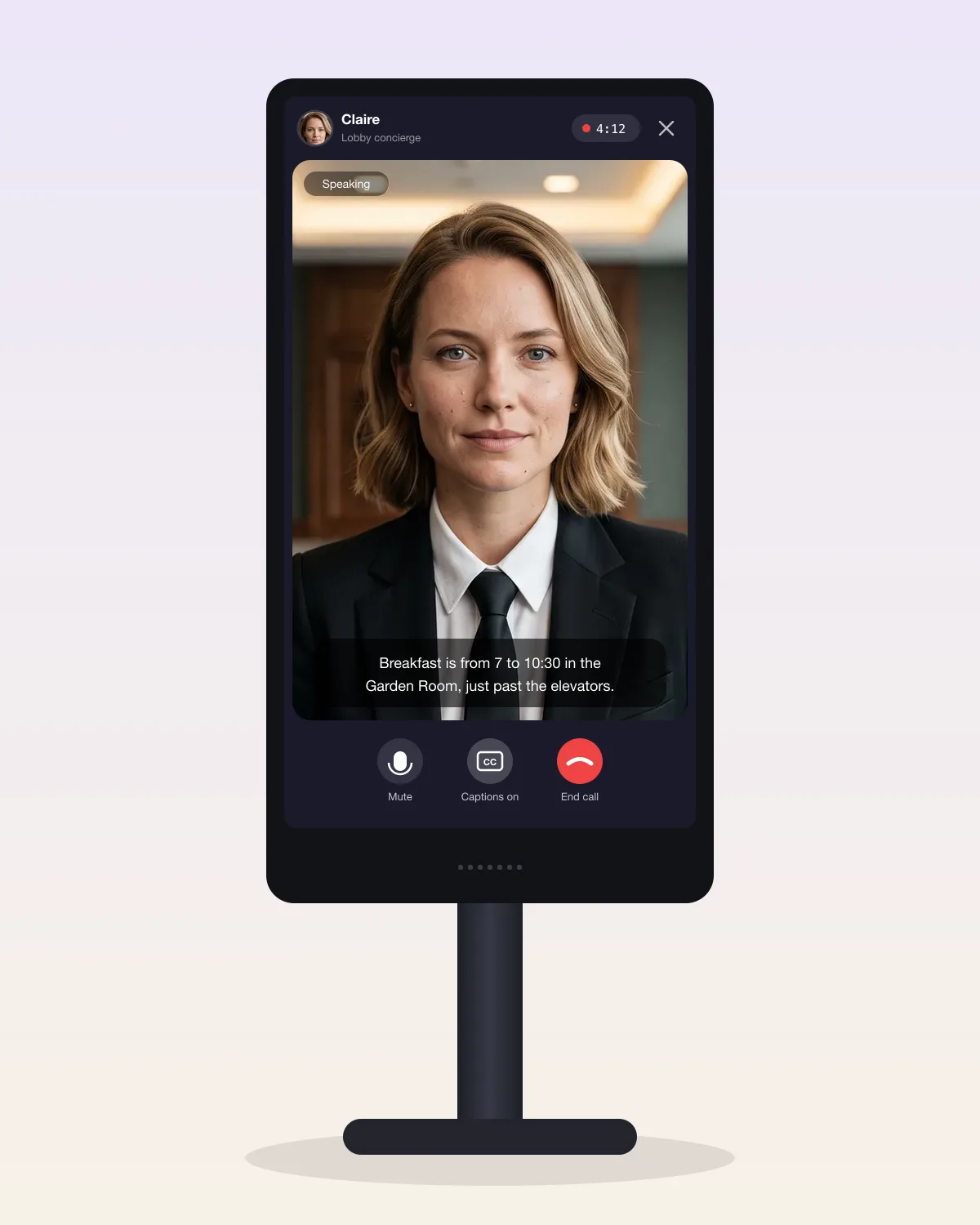
--force-device-scale-factor=2: the page then lays out like a phone's, so the video fills the screen around the avatar's head and shoulders, and the text and buttons double in size. At normal scale it shows the avatar in a 16:9 frame.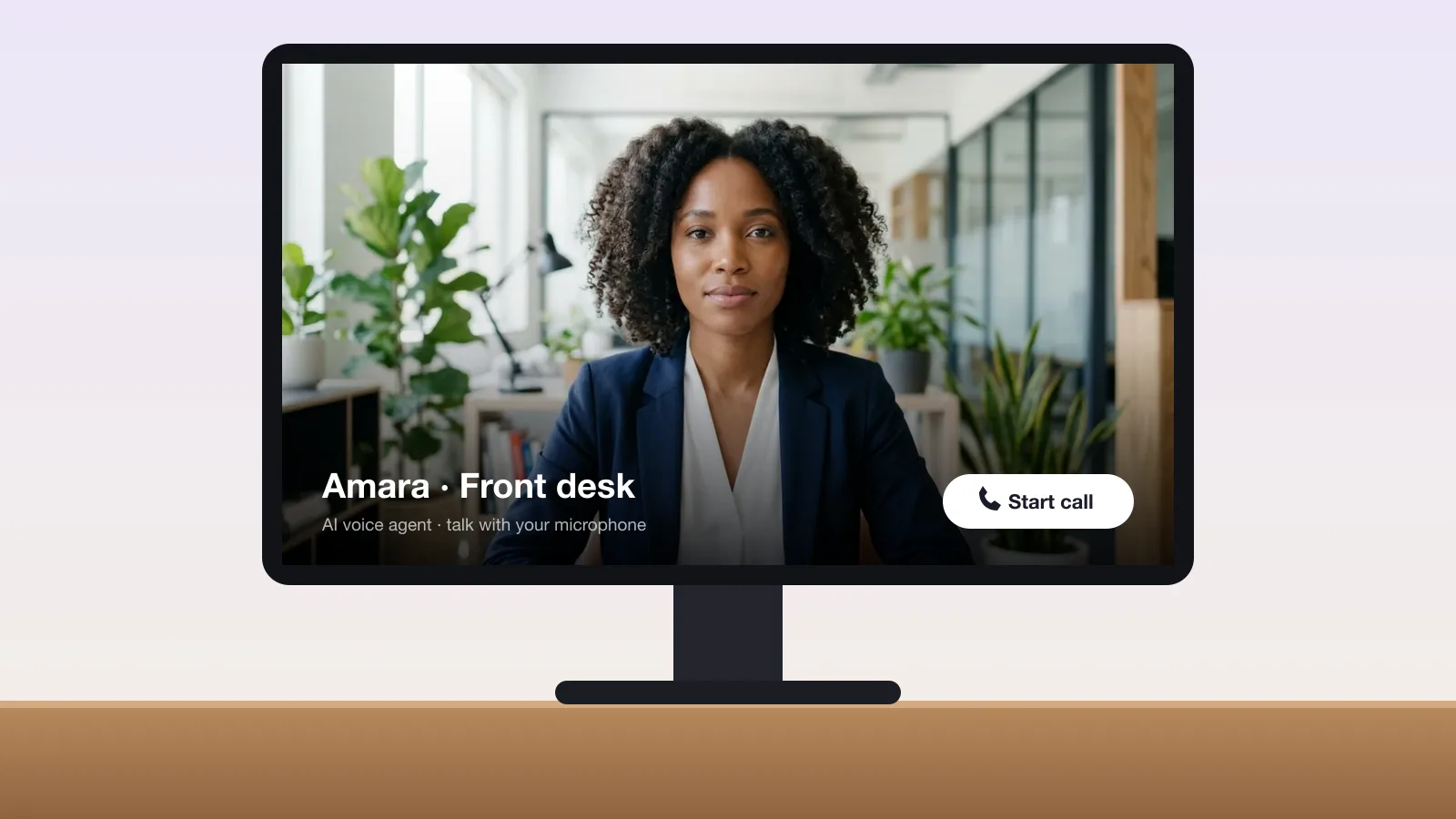
Illustrations of the call page on kiosk hardware, with the library avatars Claire and Amara.
Ways to build it
Three ways to build an AI avatar kiosk
Choose by who builds it and how busy the screen is. All three run in a browser on the kiosk hardware you choose.
Most people already choose self-service: nearly two-thirds of US online adults prefer self-checkout when it's available, according to Forrester (September 2025). An avatar kiosk takes self-service from buttons to questions.
| Compared on | No-code voice agent | Realistic avatar API | Open Source 3D avatar |
|---|---|---|---|
| Who builds it | Anyone, in the dashboard | A developer | A developer |
| The avatar | A photorealistic person from the library, or your own ($199 once) | The same photorealistic avatars | A 3D avatar: built in, or your own .glb |
| The AI and the voice | Included | Yours: OpenAI Realtime, LiveKit Agents, Pipecat or any TTS | Yours |
| Price | $0.06 a minute, all in | $0.02 a minute for the avatar, plus your AI | Free (MIT) |
| Visitors a day | No call limit; calls up to 60 minutes | No call limit; sessions up to 3 hours | No limit |
| The screen | Our call page, full screen; a visitor taps Start call | Your own app: your layout, and your trigger, such as a tap or a motion sensor | Your own app |
| Without internet | Doesn't work | Doesn't work | The avatar runs on the device; you'd need local speech and AI too |
| Start here | Receptionist template | API quickstart | Open Source SDK |
On the API, start the avatar when a visitor taps and close it when they leave: a session left open bills every minute, $14.40 for 12 hours.
Hardware and setup
What you need on site
A touchscreen
Any size, portrait or landscape, so visitors can tap Start call and End call.
A computer with a current browser
A mini PC, or a display or media player with current Chrome, Edge, Firefox or Safari. The avatar is rendered on our servers, so the kiosk needs no graphics card.
A microphone made for distance
A conference or array microphone that hears a visitor standing in front of the screen, with Noise reduction set to Far field. Built-in webcam microphones struggle in a lobby.
Speakers
Next to the screen, loud enough for the visitor in front of it rather than the whole room.
A steady internet connection
Wired where you can. The avatar reaches the screen as live video, and without a connection the kiosk can't start a call.
A notice by the screen
Tell visitors they're talking to an AI and that conversations are transcribed. The agent never uses the camera.
Run the browser unattended
- Kiosk mode. Start Chrome with
--kioskand the agent's page,https://app.talking-avatar.dev/agent/YOUR_AGENT_ID?embed=1: full screen, with no address bar or tabs. - Microphone. Allow it once on the kiosk, or set Chrome's
AudioCaptureAllowedUrlspolicy so it's never asked. - Captions. Turn them on once during setup: the kiosk's browser remembers for every visitor after.
- Restarts. Have the computer sign in and open Chrome by itself at start-up, so the kiosk comes back after a power cut.
Monthly cost
Pay for conversations, not for screen time
A kiosk waits most of the day. You pay only while someone is talking, billed per second: the idle hours and the nights cost nothing. These examples assume 2-minute conversations over 30 days.
| Visitors a day | No-code voice agent ($0.06/min, all in) | Avatar API ($0.02/min, plus your AI) |
|---|---|---|
| 10 | $36 a month | $12 a month |
| 30 | $108 a month | $36 a month |
| 60 | $216 a month | $72 a month |
| 150 | $540 a month | $180 a month |
No kiosk license, no hardware from us, no setup fee and no contract. A visitor who walks away without ending the call leaves it running until its maximum length, so keep that short: at 5 minutes, an abandoned call costs at most $0.30.
Before you start
What it does, and what it doesn't
It does
- Talks with visitors face to face, in their language, from the facts you give it
- Alerts your team or calls your systems through tools, during the conversation
- Keeps a transcript of every conversation for you, and starts each one fresh for the next visitor
- Runs on the kiosk hardware you choose: any device with a current browser, with no app to install
It doesn't
- Work offline: the realistic avatar is streamed from our servers
- Start by itself when someone walks up: visitors tap Start call (with the API, you choose the trigger)
- Show maps, menus or product photos: it talks, with captions. For a screen of your own around the avatar, use the API
- Use the camera, recognize faces, print badges or take payments
Honest fit
When another kiosk vendor fits better
The kiosk has to work with no internet at all
bitHuman sells an offline license, $899 per character, paid once, on its Business and Enterprise plans. See bitHuman compared.
You want a life-size hologram as the centerpiece of the lobby
Hologram display makers such as Holoconnects sell the display and the AI character together, as a hardware purchase.
You want a bespoke CGI brand character across kiosks, apps and AR
UneeQ builds custom digital humans and can host them on premises. See UneeQ compared.
Pricing
$0.06per minute of conversation
Avatar, voice and AI included, billed per second from prepaid credits. No kiosk license, no subscription and no setup fee: an idle screen costs nothing. Set a monthly spending limit so a busy day can't surprise you. New accounts get $1 of free credits to try it.
What a kiosk conversation costs
| Length | Cost |
|---|---|
| 1 minutes | $0.06 |
| 2 minutes | $0.12 |
| 5 minutes | $0.30 |
Optional: a custom avatar of your own presenter or brand ambassador, $199 once; removing the "Powered by Talking Avatar" label, $19 a month.
FAQ
AI avatar kiosk questions
A kiosk is one of several places a voice agent can work. See all voice agent use cases.
What is an AI avatar kiosk?
An AI avatar kiosk is a screen in a physical place, such as a hotel lobby, an office reception, a museum or a store, where a realistic AI avatar holds a spoken conversation with visitors. It listens through a microphone, answers out loud from the facts it's given, and its face moves with every word.
How much does an AI avatar kiosk cost?
With Talking Avatar Voice Agents, $0.06 a minute of conversation, billed per second, with the avatar, AI model, speech recognition and voice included. A 2-minute visitor conversation costs $0.12, and 30 of them a day come to about $108 a month. An idle screen costs nothing, and there's no kiosk license or contract. The hardware is your own choice and cost.
What hardware does an AI kiosk need?
A touchscreen, a computer or media player with a current browser, a microphone that picks up a standing visitor (a conference or array microphone), speakers and a steady internet connection. The avatar is rendered on our servers and streamed as video, so the kiosk needs no graphics card.
Does it work on a vertical (portrait) screen?
Yes. The call page fills a portrait screen when it's laid out narrower than 640 pixels: on a 1080 × 1920 screen, start Chrome with --force-device-scale-factor=2, which also doubles the size of text and buttons. At normal scale, a wide portrait screen shows the avatar in a 16:9 frame. With the API, you lay out the avatar however you like.
Will it hear visitors in a noisy lobby?
Use a conference or array microphone and set Noise reduction to Far field. In louder places, switch turn-taking to voice activity and raise its sensitivity threshold, and turn off interruptions if background voices cut the agent off. Visitors can also turn on captions to read what it says.
Can an AI avatar kiosk work offline?
Not with the realistic avatars: they're rendered on our servers and need internet. Talking Avatar Open Source animates a 3D avatar on the device itself, so with a speech recognizer, AI model and voice that also run locally, a developer can build a kiosk that works offline. For a photorealistic avatar offline, bitHuman sells an offline license.
Which languages can visitors speak?
It understands visitors in their own language and replies in the language they speak. Pick a voice in your visitors' main language: there are 160 voices in 15 languages, and voices marked English only speak only English.
How many visitors can one kiosk handle?
One conversation at a time per screen, with no limit on how many visitors it talks to in a day. Several kiosks can share one agent.
Can it call a staff member?
Yes, through a tool: an HTTPS endpoint of yours, or a Zapier, Make or n8n webhook that posts to Slack, Teams or a pager, called with the reason and the visitor's name. It can't transfer the conversation to a phone.
Does it record visitors or use the camera?
It never uses the camera. Visitors' audio is used to understand them and reply, and each conversation's transcript is kept for you in the dashboard and sent to your webhook. The call page has no analytics or session recording. Put a notice by the screen that conversations are transcribed.
How do I stop Chrome asking for the microphone?
Allow the microphone once on the kiosk, and Chrome remembers it for that profile. On managed devices, set the AudioCaptureAllowedUrls policy to https://app.talking-avatar.dev/ so it's never asked.
Can the kiosk use our own presenter or brand ambassador?
Yes. A custom avatar of a real person is $199, one time, with their signed consent. Or pick a face from the library of ready-made avatars.
Give your lobby a face visitors can talk to
Start from the Receptionist template, write your venue's facts, and make a test call with your $1 of free credits before you set up the screen.