 Talking Avatar
AI virtual patients students can talk to out loud
Write a patient case, give it a realistic face, and let students take the history, explain a diagnosis or break bad news, out loud and face to face, as often as they need. Every encounter comes back as a transcript. You set it up in the dashboard, without developers.
- Your own cases
- Debrief at the end
- $0.90 per 15-minute encounter
- A private link per student
An AI virtual patient is a simulated patient that students interview out loud to practise history taking and clinical communication. With Talking Avatar Voice Agents, the patient is a photorealistic avatar that answers from the case you write, and reveals details only when the student asks. A 15-minute encounter costs $0.90, so 3 encounters per student cost $2.70. You write the cases; there's no ready-made case library.
Who it's for
For programs that teach the clinical conversation
Nursing schools
Admission assessments, focused histories and patient education, practised before clinical placements and between simulation lab sessions.
Medical schools
History taking and OSCE preparation, with a patient who answers only what's asked, at any hour and as many times as a student needs.
PA, NP and pharmacy programs
Focused histories, medication counselling and explaining a new prescription to a worried patient.
Hospitals and continuing education
Breaking bad news, talking with an upset family member and other conversations clinicians rarely get to practise.
How it works
From case write-up to virtual patient in an afternoon
- 1
Write the case
Start from scratch: who the patient is, their history and symptoms, what they reveal only when asked, how they feel and what they're worried about, up to 20,000 characters. Make one agent per case.
- 2
Pick a face and a voice
Choose a realistic avatar that matches the patient, and one of 160 voices. Add a debrief checklist so the patient steps out of character when the student ends the encounter.
- 3
Give each student a link
Make the agent private and create a link per student, with an expiry, a number of encounters and your student ID. Review each transcript, or send it to your own system with a post-call webhook.
# Role
You are Grace Miller, 68, a retired teacher, talking
with a nursing student in the emergency department.
This is a training simulation with a fictional patient.

# What you know (reveal only when asked)
- Chest tightness since last night after dinner, in the
  middle of the chest, 6 out of 10, worse on the stairs.
- Short of breath on exertion. No fever.
- History: high blood pressure, takes lisinopril.
- Father had a heart attack at 70. Never smoked.

# How to behave
- Worried, a little short of breath. Short answers.
- Use everyday words, never medical terms.
- Don't volunteer information or suggest a diagnosis.
- If asked about vital signs: "The nurse wrote them
  down: 150 over 90, pulse 96."
# Debrief
When the student says "end simulation", step out of
character and give short feedback:
1. Did they introduce themselves and confirm your name?
2. Which of onset, location, character, severity, timing
and what makes it worse did they ask about?
3. Did they ask about medications, allergies and family
history?
4. One thing they did well, one thing to improve.Practise your focused chest pain history with
Grace Miller, our virtual patient, before Thursday's
simulation lab. About 15 minutes:
[your personal link]
Use a quiet room with a microphone. Say "end
simulation" when you're done to get your debrief.An example case, a debrief checklist and a message to students. The case is fictional: never put real patient information into an agent.
What students and faculty get
A patient who answers like a person
A realistic face
A photorealistic avatar with lip sync and natural expressions, so students practise eye contact, tone and pacing with a person on screen.
Your cases, your curriculum
One agent per case, each with up to 20,000 characters of history, symptoms, personality and rules, and up to 10 knowledge bases.
Reveals only what's asked
The patient answers the question in front of them, in everyday words, so students learn to ask, not to wait for the full story.
A debrief at the end
Write your checklist into the case, and the patient steps out of character to tell the student what they covered and what they missed.
A private link per student
Links expire when you choose and can be limited to a number of encounters. Your student ID travels with every encounter to the webhook.
A transcript of every encounter
Faculty read exactly what each student asked and said, and grade or coach from it.
On screen
What students see
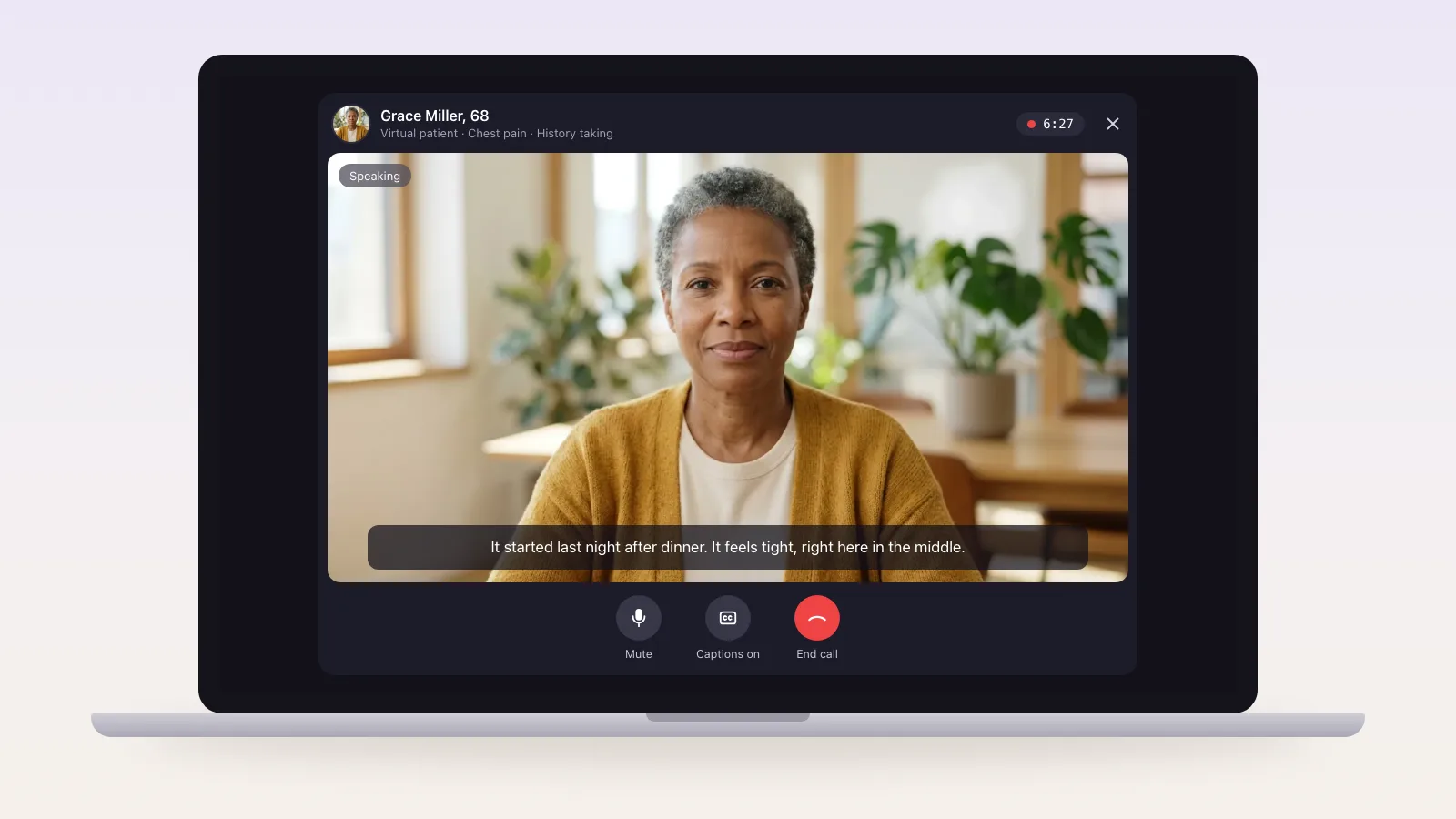
The patient's call page, in the student's browser: a realistic person who answers the questions the student asks, in their own words, and only what they're asked.
Cost per student
About $2.70 per student for 3 encounters
These examples assume 3 encounters of 15 minutes per student. With Talking Avatar Voice Agents, you pay per minute, with the avatar, the voice and the AI included: 100 students cost $270.
| Platform | What you get | Per student (3 × 15 min) |
|---|---|---|
| Talking Avatar Voice Agents | Realistic video avatar, $0.06/min | $2.70 |
| Simagine Interactive | Interactive video avatar, $0.96/min | $43.20 |
| Simagine SimPortrait | Lifelike portrait, $0.25/min | $11.25 |
| Simagine SimVoice | Voice only, $0.15/min | $6.75 |
| Voice2VoiceSim | 95 ready-made cases, 10-seat minimum | $75 a semester |
| NurseKind AI | Included in its institutional plans | $119 a year |
Prices from each vendor's own pricing page on 15 November 2026. Voice2VoiceSim and NurseKind include ready-made patient cases and faculty dashboards; here, you write the cases yourself.
Before you start
What it does, and what it doesn't
It does
- Plays the patient in your case: history, symptoms, worries and personality, revealed only when the student asks
- Talks and listens out loud, face to face, so students practise the conversation, not typing
- Steps out of character at the end and debriefs against your checklist
- Gives each student a private link, so every encounter says whose it was (private agents)
- Keeps a transcript of every encounter for faculty to review and grade
It doesn't
- Come with a library of cases: you write each one, starting from the example below
- Grade students automatically or keep a gradebook
- Show vital signs, lab results or images: it can tell students the results when they ask
- Replace hands-on skills or physical exams, or act out strong emotions: its face stays natural
- Handle real patients or real patient data: use fictional cases only
Honest fit
When another tool fits better
You want hundreds of ready-made, faculty-reviewed cases with grading
Voice2VoiceSim and NurseKind AI include case libraries and faculty dashboards, at the prices above.
You need vital signs, monitors and hands-on skills
Manikin, screen-based or VR clinical simulation is built for that. Use a talking patient for the history and the conversation.
Pricing
$0.06per minute of conversation
Avatar, voice and AI included, billed per second from prepaid credits. No seat licences and no subscription: 3 encounters of 15 minutes cost $2.70 per student. New accounts get $1 of free credits to try it.
What an encounter costs
| Length | Cost |
|---|---|
| 10 minutes | $0.60 |
| 15 minutes | $0.90 |
| 30 minutes | $1.80 |
FAQ
AI virtual patient questions
Patient simulation is one of several things a voice agent can do. See all voice agent use cases.
What is an AI virtual patient?
An AI virtual patient is a simulated patient that students talk to, to practise history taking and clinical communication. With Talking Avatar, it's a photorealistic avatar that speaks and listens, and answers from the case you write, so students practise the real conversation instead of typing questions.
How much does an AI virtual patient cost per student?
$0.06 a minute, billed per second, with the avatar, the AI model and the voice included. A 15-minute encounter costs $0.90, and 3 encounters per student cost $2.70. There are no seat licences, so students who don't practise cost nothing.
Can we write our own patient cases?
Yes, and you have to: there's no ready-made case library. Each case is an agent with its own instructions, up to 20,000 characters: the patient's history, symptoms, personality, what they reveal only when asked, and a debrief checklist.
Does it grade students?
Not automatically. The patient can step out of character at the end and debrief against your checklist, and faculty get a transcript of every encounter to grade from. There's no gradebook or LMS integration.
Can faculty see each student's encounters?
Yes. Make the agent private and create a link per student, with your own student ID. Every encounter shows which link it came from, and the post-call webhook sends the transcript with your student ID to your own system.
Can it show vital signs or lab results?
It can't show them on screen. Write them into the case, and the patient or a line like "the nurse wrote them down" gives them out loud when the student asks.
Can the patient be anxious, in pain or angry?
In what it says and how it says it, yes: write it into the case. The avatar's face keeps natural, subtle expressions; it doesn't act out strong emotions.
Can we use real patient information?
No. Use fictional cases only. This is a training simulation, not a clinical tool.
Can students practise in other languages?
Yes. The patient understands students in their language and replies in it, with 160 voices in 15 languages. Make a test call in each language first.
Give every student a patient to practise with
Write your first case, pick a face, and run a test encounter with your $1 of free credits.